W3lkin's Universe
「你就像是一阵风,在我这里掀起了万丈波澜,却又跟着云去了远方」
April 13th, 2023
这一次实现了全站https,https其实本来也没啥,但是我不是用的一键搭建的,所以自己改了半天的Nginx配置文件。之前宝塔配置https一直有问题,我很疑惑。现在知道原因了,在cdn上面也是要上传证书的。我的博客也蛮有意思的,直接跑在docker里面。
静态的页面全部在docker里,写好了dockerfile,随时可以一键迁移。docker-compose.yml 这里要映射443(我踩了好些坑)
version: '2'
services:
  checkin:
    image: w3lkinblog
    restart: always
    build:
      context: .
      dockerfile: ./Dockerfile
    ports:
      - "要映射出来的端口:443"
dockerfile其中ssl文件夹放置证书,src放置网站源码,Nginx放置Nginx配置文件
FROM webdevops/php-nginx:5.6


COPY src/ /app
COPY ssl/ /tmp
COPY nginx/nginx.conf ./etc/nginx/nginx.conf

RUN chmod -R 777 /app/* \
    && service nginx restart

EXPOSE 80
Nginx.conf写的很乱,主要是能实现功能就行,要加站直接照着模板套就行
user www-data;
worker_processes auto;
pid /run/nginx.pid;
include /etc/nginx/modules-enabled/*.conf;

events {
        worker_connections 768;
        # multi_accept on;
}

http {

        ##
        # Basic Settings
        ##
        server{
        listen 80;
        server_name www.pwns.fun;
        rewrite ^(.*) https://www.pwns.fun permanent;
        root "/app/pwnsfunblog";
        location / {
            index index.php index.html;
}
}
        # HTTPS server
        #
        server {
        listen 443 ssl;
        server_name www.pwns.fun;

        ssl on;

        ssl_certificate /tmp/pwns.fun_nginx/pwns.fun_bundle.pem;
        ssl_certificate_key /tmp/pwns.fun_nginx/pwns.fun.key;

        ssl_session_cache shared:SSL:1m;
        ssl_session_timeout 5m;

        ssl_ciphers HIGH:!aNULL:!MD5;
        ssl_prefer_server_ciphers on;
        root "/app/pwnsfunblog";
        location / {
        index index.php index.html;
        }
        location ~ \.php(.*)$  {
            fastcgi_pass   127.0.0.1:9000;
            fastcgi_index  index.php;
            fastcgi_split_path_info  ^((?U).+\.php)(/?.+)$;
            fastcgi_param  SCRIPT_FILENAME  $document_root$fastcgi_script_name;
            fastcgi_param  PATH_INFO  $fastcgi_path_info;
            fastcgi_param  PATH_TRANSLATED  $document_root$fastcgi_path_info;
            include        fastcgi_params;
        }
        }


        server{
        listen 80;
        server_name pwns.fun;
        rewrite ^(.*) https://pwns.fun permanent;
        root "/app/pwnsfunblog";
        location / {
            index index.php index.html;
}
}
        # HTTPS server
        #
        server {
        listen 443 ssl;
        server_name pwns.fun;

        ssl on;

        ssl_certificate /tmp/pwns.fun_nginx/pwns.fun_bundle.pem;
        ssl_certificate_key /tmp/pwns.fun_nginx/pwns.fun.key;

        ssl_session_cache shared:SSL:1m;
        ssl_session_timeout 5m;

        ssl_ciphers HIGH:!aNULL:!MD5;
        ssl_prefer_server_ciphers on;
        root "/app/pwnsfunblog";
        location / {
        index index.php index.html;
        }
        location ~ \.php(.*)$  {
            fastcgi_pass   127.0.0.1:9000;
            fastcgi_index  index.php;
            fastcgi_split_path_info  ^((?U).+\.php)(/?.+)$;
            fastcgi_param  SCRIPT_FILENAME  $document_root$fastcgi_script_name;
            fastcgi_param  PATH_INFO  $fastcgi_path_info;
            fastcgi_param  PATH_TRANSLATED  $document_root$fastcgi_path_info;
            include        fastcgi_params;
        }
        }

        server{
        listen 80;
        server_name universe.pwns.fun;
        rewrite ^(.*) https://universe.pwns.fun permanent;
        root "/app/pwnsfunlove";
        location / {
            index index.php index.html;
}
}
        # HTTPS server
        #
        server {
        listen 443 ssl;
        server_name universe.pwns.fun;

        ssl on;

        ssl_certificate /tmp/universe.pwns.fun_nginx/universe.pwns.fun_bundle.pem;
        ssl_certificate_key /tmp/universe.pwns.fun_nginx/universe.pwns.fun.key;

        ssl_session_cache shared:SSL:1m;
        ssl_session_timeout 5m;

        ssl_ciphers HIGH:!aNULL:!MD5;
        ssl_prefer_server_ciphers on;
        root "/app/pwnsfunlove";
        location / {
        index index.php index.html;
        }
        location ~ \.php(.*)$  {
            fastcgi_pass   127.0.0.1:9000;
            fastcgi_index  index.php;
            fastcgi_split_path_info  ^((?U).+\.php)(/?.+)$;
            fastcgi_param  SCRIPT_FILENAME  $document_root$fastcgi_script_name;
            fastcgi_param  PATH_INFO  $fastcgi_path_info;
            fastcgi_param  PATH_TRANSLATED  $document_root$fastcgi_path_info;
            include        fastcgi_params;
        }
        }

        server{
        listen 80;
        server_name admin.pwns.fun;
        rewrite ^(.*) https://admin.pwns.fun permanent;
        root "/app/pwnsfunadmin";
        location / {
            index index.php index.html;
}
}
        # HTTPS server
        #
        server {
        listen 443 ssl;
        server_name admin.pwns.fun;

        ssl on;

        ssl_certificate /tmp/admin.pwns.fun_nginx/admin.pwns.fun_bundle.pem;
        ssl_certificate_key /tmp/admin.pwns.fun_nginx/admin.pwns.fun.key;

        ssl_session_cache shared:SSL:1m;
        ssl_session_timeout 5m;

        ssl_ciphers HIGH:!aNULL:!MD5;
        ssl_prefer_server_ciphers on;
        root "/app/pwnsfunadmin";
        location / {
        index index.php index.html;
        }
        location ~ \.php(.*)$  {
            fastcgi_pass   127.0.0.1:9000;
            fastcgi_index  index.php;
            fastcgi_split_path_info  ^((?U).+\.php)(/?.+)$;
            fastcgi_param  SCRIPT_FILENAME  $document_root$fastcgi_script_name;
            fastcgi_param  PATH_INFO  $fastcgi_path_info;
            fastcgi_param  PATH_TRANSLATED  $document_root$fastcgi_path_info;
            include        fastcgi_params;
        }
        }

        sendfile on;
        tcp_nopush on;
        tcp_nodelay on;
        keepalive_timeout 65;
        types_hash_max_size 2048;
        # server_tokens off;

        # server_names_hash_bucket_size 64;
        # server_name_in_redirect off;

        include /etc/nginx/mime.types;
        default_type application/octet-stream;

        ##
        # SSL Settings
        ##

        ssl_protocols TLSv1 TLSv1.1 TLSv1.2; # Dropping SSLv3, ref: POODLE
        ssl_prefer_server_ciphers on;

        ##
        # Logging Settings
        ##

        access_log /docker.stdout ;
        error_log /docker.stderr ;

        ##
        # Gzip Settings
        ##

        gzip on;
        gzip_disable "msie6";

        # gzip_vary on;
        # gzip_proxied any;
        # gzip_comp_level 6;
        # gzip_buffers 16 8k;
        # gzip_http_version 1.1;
        # gzip_types text/plain text/css application/json application/javascript text/xml application/xml application/xml+rss text/javascript;

        ##
        # Virtual Host Configs
        ##

        include /etc/nginx/conf.d/*.conf;
        include /etc/nginx/sites-enabled/*;
}


#mail {
#       # See sample authentication script at:
#       # http://wiki.nginx.org/ImapAuthenticateWithApachePhpScript
#
#       # auth_http localhost/auth.php;
#       # pop3_capabilities "TOP" "USER";
#       # imap_capabilities "IMAP4rev1" "UIDPLUS";
#
#       server {
#               listen     localhost:110;
#               protocol   pop3;
#               proxy      on;
#       }
#
#       server {
#               listen     localhost:143;
#               protocol   imap;
#               proxy      on;
#       }
#}
到这一步先使用https://ip:端口 请求头中带绑定的host地址去访问能成功访问了就说明配置成了,接着再去配置cdn我这里用的是七牛云
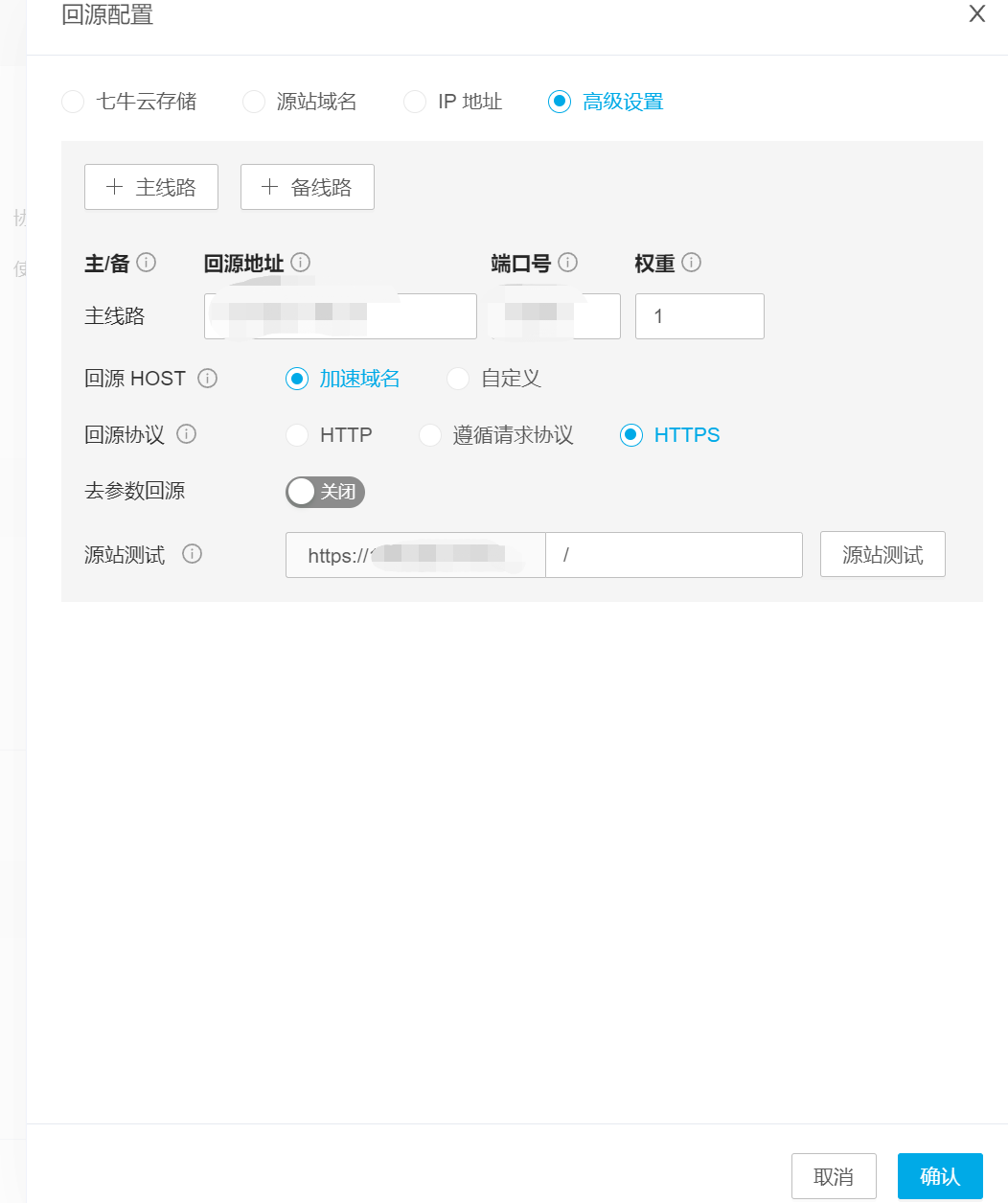
先在七牛云创建cdn,然后域名进行CNAME解析去七牛云上传证书配置回源地址我这里就不用缓存了打开强制https这样就ok了
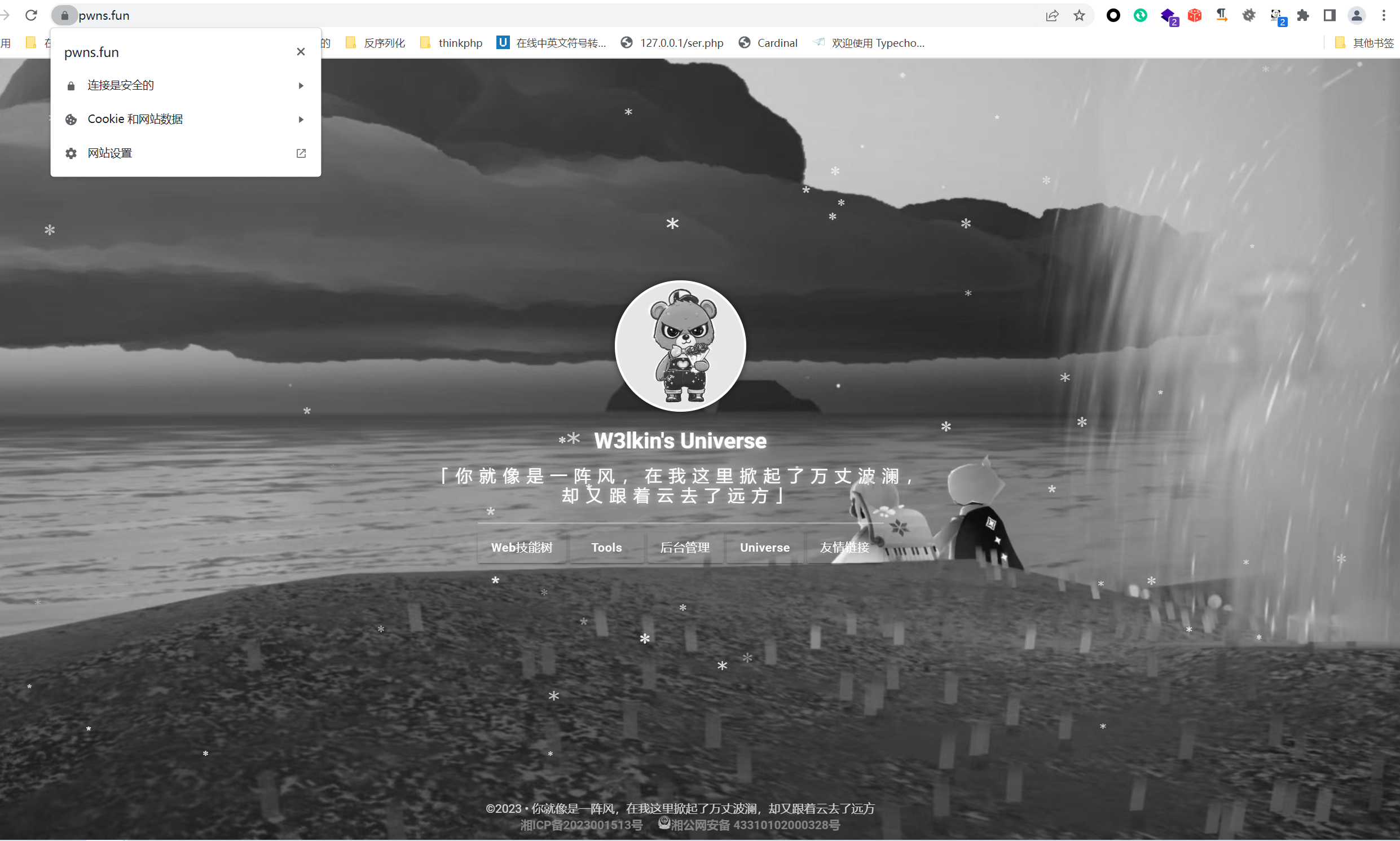
很漂亮,博客预计未来很长一段时间不会有啥变化了,我要的功能已经实现了,页面我也非常的喜欢。但这个灰色的主页确实有点丑了。不设置灰色还是很好看的。看吧,看啥时候能取消掉灰色。

background
这一次实现了全站https,https其实本来也没啥,但是我不是用的一键搭建的,所以自己改了半天的Nginx配置文件。之前宝塔配置https一直有问题,我很疑惑。现在知道原因了,在cdn上面也是要上传证书的。我的博客也蛮有意思的,直接跑在docker里面。
博客架构
静态的页面全部在docker里,写好了dockerfile,随时可以一键迁移。
docker-compose.yml 这里要映射443(我踩了好些坑)
dockerfile
其中ssl文件夹放置证书,src放置网站源码,Nginx放置Nginx配置文件
Nginx.conf
写的很乱,主要是能实现功能就行,要加站直接照着模板套就行
到这一步先使用https://ip:端口 请求头中带绑定的host地址去访问
能成功访问了就说明配置成了,接着再去配置cdn
我这里用的是七牛云
先在七牛云创建cdn,然后域名进行CNAME解析

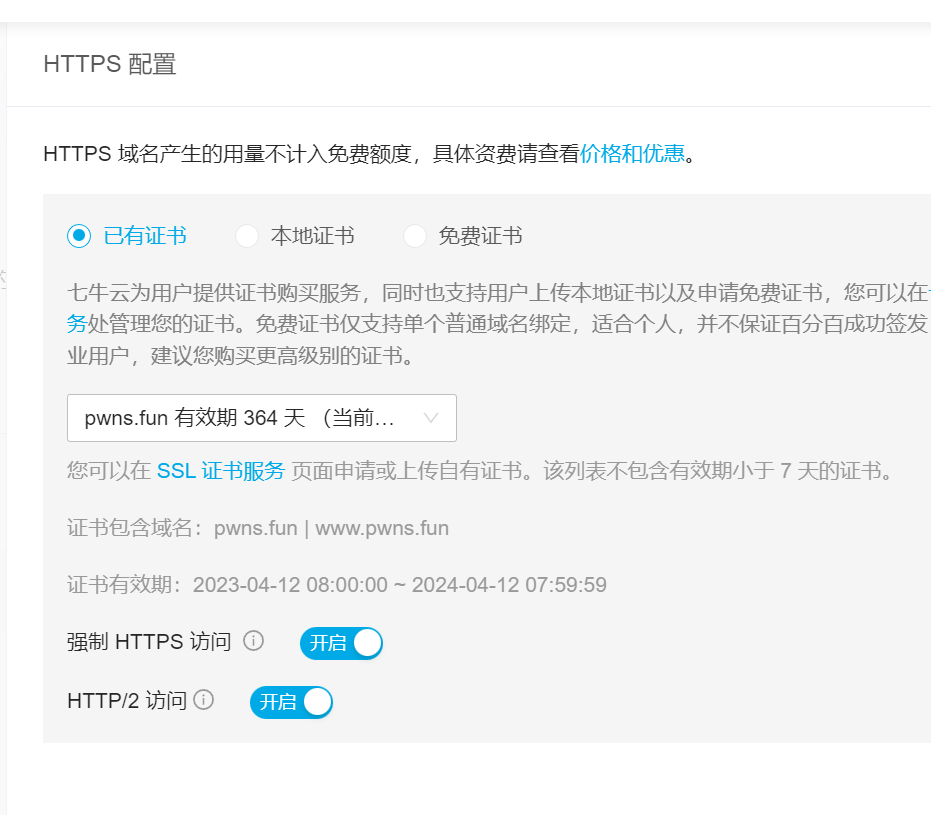
去七牛云上传证书
配置回源地址
我这里就不用缓存了
打开强制https
这样就ok了
很漂亮,博客预计未来很长一段时间不会有啥变化了,我要的功能已经实现了,页面我也非常的喜欢。但这个灰色的主页确实有点丑了。不设置灰色还是很好看的。看吧,看啥时候能取消掉灰色。